
Introduction
As part of ckad certification, am following the school of devops certification path. One of the task I liked was the eksctl path.
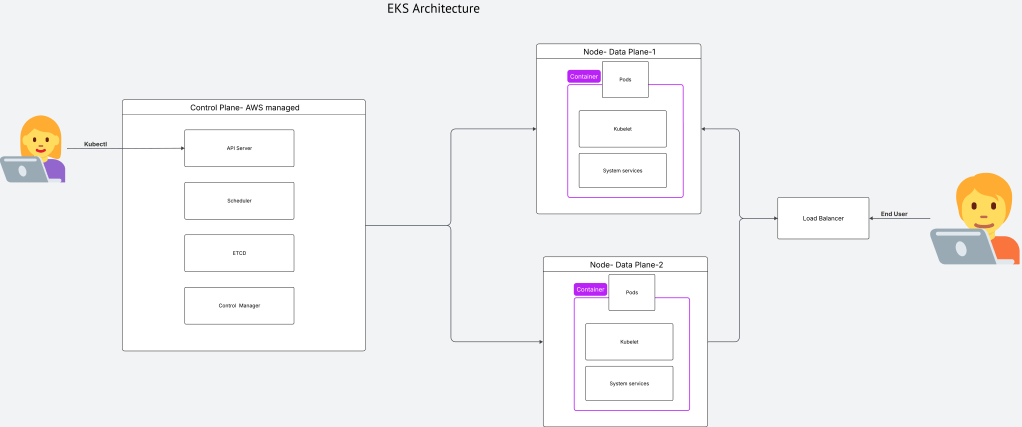
eksctl provides a simple YAML-based approach to provisioning EKS clusters. As shown below, the control plane is managed by AWS and the dataplane/nodegroups are application responsibility.
However, as infrastructure complexity grows, teams often require Terraform’s state management, modular architecture, and integration with broader IaC pipelines. This document provides a technical reference for converting an eksctl cluster.yaml to an equivalent Terraform module, achieving functional parity with explicit resource definitions.
Overview
Source: 37-line eksctl YAML Target: ~300-line Terraform module Terraform version: >= 1.3.0 AWS Provider: ~> 5.0
Source Configuration
apiVersion: eksctl.io/v1alpha5
kind: ClusterConfig

metadata:
  name: my-eks-cluster
  region: us-east-1

vpc:
  id: "vpc-xxxxxxxxxxxxxxxxx"
  subnets:
    public:
      zone-a:
        id: subnet-xxxxxxxxxxxxxxxxx
      zone-b:
        id: subnet-xxxxxxxxxxxxxxxxx
      zone-c:
        id: subnet-xxxxxxxxxxxxxxxxx

managedNodeGroups:
  - name: ng-workers
    labels: { role: workers }
    instanceType: t2.micro
    desiredCapacity: 2
    maxPodsPerNode: 100
    minSize: 1
    maxSize: 4
    ssh:
      allow: true
      publicKeyName: my-ssh-key
    tags:
      k8s.io/cluster-autoscaler/enabled: "true"
      k8s.io/cluster-autoscaler/my-eks-cluster: "owned"

iam:
  withOIDC: true
  serviceRoleARN: arn:aws:iam::XXXXXXXXXXXX:role/eks-cluster-service-role
Resource Mapping
| eksctl Field | Terraform Resource | Terraform Attribute |
|---|---|---|
metadata.name |
aws_eks_cluster |
name |
metadata.region |
provider "aws" |
region |
vpc.id |
aws_eks_cluster |
vpc_config.subnet_ids (derived) |
vpc.subnets.public.* |
data.aws_subnet |
id |
managedNodeGroups[*] |
aws_eks_node_group |
— |
managedNodeGroups[*].name |
aws_eks_node_group |
node_group_name |
managedNodeGroups[*].instanceType |
aws_eks_node_group |
instance_types |
managedNodeGroups[*].desiredCapacity |
aws_eks_node_group |
scaling_config.desired_size |
managedNodeGroups[*].minSize |
aws_eks_node_group |
scaling_config.min_size |
managedNodeGroups[*].maxSize |
aws_eks_node_group |
scaling_config.max_size |
managedNodeGroups[*].labels |
aws_eks_node_group |
labels |
managedNodeGroups[*].ssh.publicKeyName |
aws_launch_template |
key_name |
managedNodeGroups[*].tags |
aws_eks_node_group |
tags |
iam.withOIDC |
aws_iam_openid_connect_provider |
— |
iam.serviceRoleARN |
aws_eks_cluster |
role_arn |
Terraform Resources Required
1. EKS Cluster
resource "aws_eks_cluster" "this" {
  name     = var.cluster_name
  role_arn = var.service_role_arn
  version  = var.cluster_version

  vpc_config {
    subnet_ids = [
      data.aws_subnet.public_a.id,
      data.aws_subnet.public_b.id,
      data.aws_subnet.public_c.id
    ]
    endpoint_private_access = false
    endpoint_public_access  = true
    security_group_ids      = [aws_security_group.control_plane.id]
  }

  tags = var.common_tags
}
2. OIDC Provider
Required for IAM Roles for Service Accounts (IRSA).
data "tls_certificate" "cluster" {
  count = var.enable_oidc ? 1 : 0
  url   = aws_eks_cluster.this.identity[0].oidc[0].issuer
}

resource "aws_iam_openid_connect_provider" "cluster" {
  count           = var.enable_oidc ? 1 : 0
  client_id_list  = ["sts.amazonaws.com"]
  thumbprint_list = [data.tls_certificate.cluster[0].certificates[0].sha1_fingerprint]
  url             = aws_eks_cluster.this.identity[0].oidc[0].issuer
}
3. Node Group IAM Role
eksctl attaches three managed policies automatically. Terraform requires explicit attachment.
resource "aws_iam_role" "node_group" {
  name = "${var.cluster_name}-node-group-role"

  assume_role_policy = jsonencode({
    Version = "2012-10-17"
    Statement = [{
      Action = "sts:AssumeRole"
      Effect = "Allow"
      Principal = { Service = "ec2.amazonaws.com" }
    }]
  })
}

resource "aws_iam_role_policy_attachment" "node_AmazonEKSWorkerNodePolicy" {
  policy_arn = "arn:aws:iam::aws:policy/AmazonEKSWorkerNodePolicy"
  role       = aws_iam_role.node_group.name
}

resource "aws_iam_role_policy_attachment" "node_AmazonEKS_CNI_Policy" {
  policy_arn = "arn:aws:iam::aws:policy/AmazonEKS_CNI_Policy"
  role       = aws_iam_role.node_group.name
}

resource "aws_iam_role_policy_attachment" "node_AmazonEC2ContainerRegistryReadOnly" {
  policy_arn = "arn:aws:iam::aws:policy/AmazonEC2ContainerRegistryReadOnly"
  role       = aws_iam_role.node_group.name
}
4. Security Groups
eksctl creates two security groups. EKS auto-creates a third (cluster security group).
Control Plane Security Group:
resource "aws_security_group" "control_plane" {
  name_prefix = "${var.cluster_name}-ControlPlaneSecurityGroup-"
  description = "Communication between the control plane and worker nodegroups"
  vpc_id      = var.vpc_id

  egress {
    from_port   = 0
    to_port     = 0
    protocol    = "-1"
    cidr_blocks = ["0.0.0.0/0"]
  }
}
NodePort Security Group:
resource "aws_security_group" "nodeport" {
  name        = "${var.cluster_name}-nodeport-sg"
  description = "Security group for Kubernetes NodePort services (30000-32767)"
  vpc_id      = var.vpc_id

  ingress {
    from_port   = 30000
    to_port     = 32767
    protocol    = "tcp"
    cidr_blocks = ["0.0.0.0/0"]
  }

  egress {
    from_port   = 0
    to_port     = 0
    protocol    = "-1"
    cidr_blocks = ["0.0.0.0/0"]
  }
}
5. Launch Template
eksctl uses a launch template for SSH access, not the remote_access block.
resource "aws_launch_template" "node_group" {
  name_prefix = "${var.cluster_name}-${var.node_group_name}-"
  key_name    = var.ssh_key_name

  vpc_security_group_ids = [
    aws_eks_cluster.this.vpc_config[0].cluster_security_group_id,
    aws_security_group.nodeport.id
  ]

  block_device_mappings {
    device_name = "/dev/xvda"
    ebs {
      volume_size           = 80
      volume_type           = "gp3"
      iops                  = 3000
      throughput            = 125
      delete_on_termination = true
    }
  }

  metadata_options {
    http_endpoint               = "enabled"
    http_tokens                 = "required"
    http_put_response_hop_limit = 2
  }
}
6. Managed Node Group
resource "aws_eks_node_group" "workers" {
  cluster_name    = aws_eks_cluster.this.name
  node_group_name = var.node_group_name
  node_role_arn   = aws_iam_role.node_group.arn
  subnet_ids      = [
    data.aws_subnet.public_a.id,
    data.aws_subnet.public_b.id,
    data.aws_subnet.public_c.id
  ]

  instance_types = [var.node_instance_type]

  scaling_config {
    desired_size = var.node_desired_capacity
    min_size     = var.node_min_size
    max_size     = var.node_max_size
  }

  update_config {
    max_unavailable = 1
  }

  launch_template {
    id      = aws_launch_template.node_group.id
    version = "$Latest"
  }

  labels = var.node_labels
  tags   = merge(var.common_tags, var.node_group_tags)

  depends_on = [
    aws_iam_role_policy_attachment.node_AmazonEKSWorkerNodePolicy,
    aws_iam_role_policy_attachment.node_AmazonEKS_CNI_Policy,
    aws_iam_role_policy_attachment.node_AmazonEC2ContainerRegistryReadOnly,
  ]
}
7. EKS Addons
eksctl installs four addons. Two work reliably via Terraform.
resource "aws_eks_addon" "vpc_cni" {
  cluster_name = aws_eks_cluster.this.name
  addon_name   = "vpc-cni"
  depends_on   = [aws_eks_cluster.this]
}

resource "aws_eks_addon" "kube_proxy" {
  cluster_name = aws_eks_cluster.this.name
  addon_name   = "kube-proxy"
  depends_on   = [aws_eks_cluster.this]
}
Not managed as addons:
coredns— EKS deploys automatically; addon management causes stuckCREATINGstatusmetrics-server— Often fails withCREATE_FAILED; install via Helm if needed
Variables
variable "region"              { type = string }
variable "cluster_name"        { type = string }
variable "cluster_version"     { type = string; default = "1.32" }
variable "vpc_id"              { type = string }
variable "subnet_id_a"         { type = string }
variable "subnet_id_b"         { type = string }
variable "subnet_id_c"         { type = string }
variable "service_role_arn"    { type = string }
variable "enable_oidc"         { type = bool; default = true }
variable "node_group_name"     { type = string }
variable "node_instance_type"  { type = string }
variable "node_desired_capacity" { type = number }
variable "node_min_size"       { type = number }
variable "node_max_size"       { type = number }
variable "node_labels"         { type = map(string); default = {} }
variable "ssh_key_name"        { type = string }
variable "common_tags"         { type = map(string); default = {} }
variable "node_group_tags"     { type = map(string); default = {} }
Known Issues
| Issue | Cause | Resolution |
|---|---|---|
coredns addon stuck in CREATING |
AWS EKS bug | Do not manage as addon; EKS deploys automatically |
metrics-server CREATE_FAILED |
Addon compatibility issues | Install via Helm post-cluster creation |
| SSH requires launch template | remote_access block creates extra SGs |
Use launch_template block instead |
| IAM propagation delay | AWS eventual consistency | Add depends_on for policy attachments |
Verification
# Cluster status
aws eks describe-cluster --name $CLUSTER_NAME --region $REGION \
  --query 'cluster.status'

# Addons
aws eks list-addons --cluster-name $CLUSTER_NAME --region $REGION

# Node group
aws eks describe-nodegroup --cluster-name $CLUSTER_NAME \
  --nodegroup-name $NODE_GROUP_NAME --region $REGION \
  --query 'nodegroup.{status:status,desiredSize:scalingConfig.desiredSize}'

# OIDC provider
aws eks describe-cluster --name $CLUSTER_NAME --region $REGION \
  --query 'cluster.identity.oidc.issuer'

# Configure kubectl
aws eks update-kubeconfig --region $REGION --name $CLUSTER_NAME
kubectl get nodes
Outputs
output "cluster_endpoint"       { value = aws_eks_cluster.this.endpoint }
output "cluster_security_group" { value = aws_eks_cluster.this.vpc_config[0].cluster_security_group_id }
output "oidc_provider_arn"      { value = aws_iam_openid_connect_provider.cluster[0].arn }
output "node_group_arn"         { value = aws_eks_node_group.workers.arn }
output "configure_kubectl"      { value = "aws eks update-kubeconfig --region ${var.region} --name ${aws_eks_cluster.this.name}" }

 Sathish Jayapal
You must be logged in to post a comment.