When working on the Runs project, one design demand was to avoid two-phase commits between different microservices. In earlier posts, I wrote about various apps and how event-driven architecture helps with solution-driving. One developmental task involved a particularly complex scenario. I am writing this post to share my experience of overcoming it with you.
Issue:
Step 1-
When MS – A completes a CRUD operation, I want to event that out. This allows MS—B to react to the event that happened in MS – A. Still, when MS—B is responding, it should only react after MS -A has completed its CRUD operation. There must also be no lingering exceptions in MS- A transactions. Once this is addressed, the transaction information must be stored securely in an Event store. This provides a reliable source of truth.
Step 2-
Now, create a separate transaction. This transaction will read the events that occurred due to the MS-A operation. It will drop them into the MQ/Kafka topic for the subscribers, in our case, MS-B.
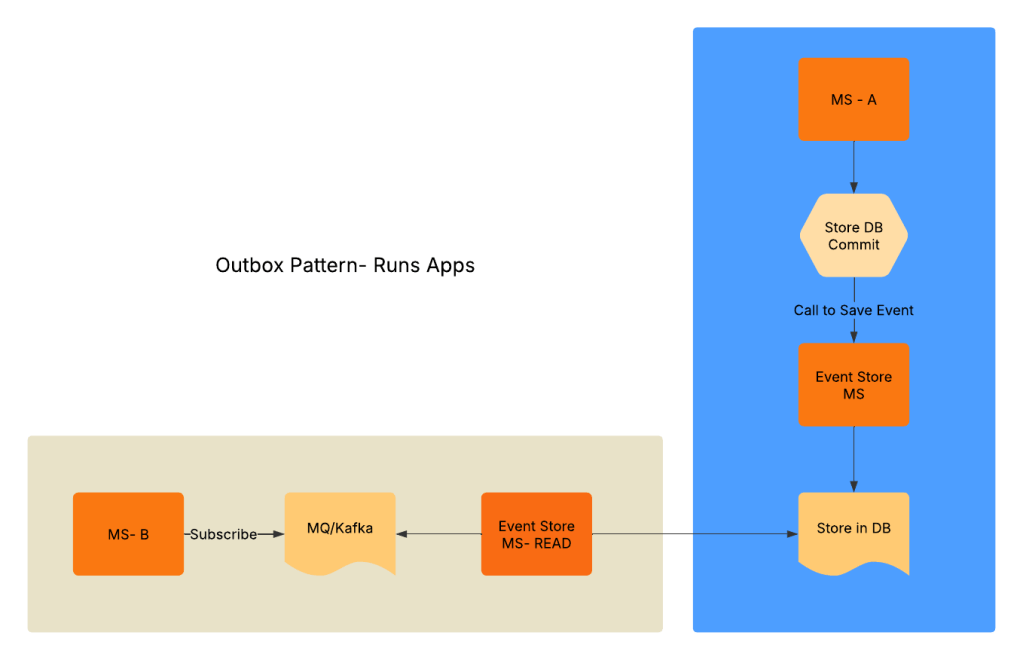
In the runs project, there were two microservices that served the purpose. GarminInitializer MS was responsible for initializing and processing the running data. GarminRunsData MS handled storing and managing the processed running data. GarminInitilzer’s single responsibility is to take a file uploaded to Azure Blob. It then processes the data. Finally, it stores the information in a DB. Event, that service has processed the file for the day. Depending on the iterations, I intended to feed that file all my runs. Alternatively, I selected a specific set of runs I wanted to analyze. When running the initializer, some of the run records were failing, and Spring’s transaction was rolling back the records. But despite the rollbacks, the system indicated the file was processed. This caused some problems lower down the stream – GarminRunsData MS. To resolve this issue, here is the change of architecture for the Runs project. It also explains how to outbox transaction was implemented.
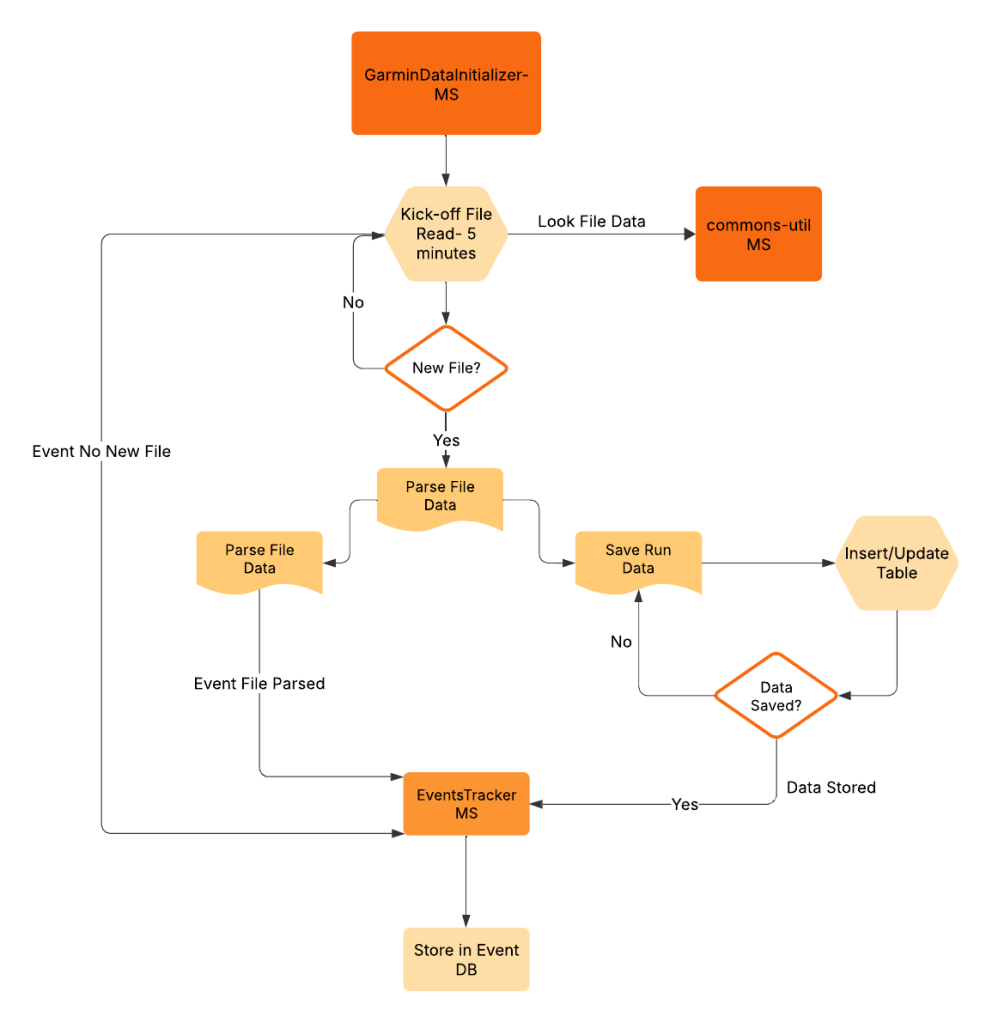
Here is the code for GarminDataInitializer. The service kicks off every 5 minutes. It checks if there is a new data file to process. It uses the spring scheduler for auto kick-off.
@SpringBootApplication
@EnableScheduling
@EnableDiscoveryClient

public class GarminDataInitializerApplication {
    public static void main(String[] args) {
        SpringApplication.run(GarminDataInitializerApplication.class, args);
    }
}
Here is the code for the readLines() method, which checks and reads all the lines from the file and sends an event note to the event tracker that all file lines have been read successfully
@Transactional
    List<RawActivities> getRawActivities() throws IOException, InterruptedException, CsvErrorsExceededException {
        if ((blobNameUrl != null && blobNameUrl.startsWith("http"))
                || (urlName != null && urlName.startsWith("http"))) {
            HttpResponse<InputStream> response = HttpClient.newHttpClient()
                    .send(
                            HttpRequest.newBuilder()
                                    .uri(URI.create(blobNameUrl != null ? blobNameUrl : urlName))
                                    .build(),
                            HttpResponse.BodyHandlers.ofInputStream());
            if (response.statusCode() != 200) {
                logger.error("Error in fetching the file from the url");
                retryService.performTask();
                throw new IOException("Error in fetching the file from the url");
            }
            updateUploadMetaDataDetails(blobNameUrl != null ? blobNameUrl : urlName);

            return engine.parseFirstLinesOfInputStream(response.body(), RawActivities.class, 1000)
                    .getObjects();
        }
        updateUploadMetaDataDetails(fileName);

        return engine.parseFirstLinesOfInputStream(getCsvFile(), RawActivities.class, 1000)
                .getObjects();
    }
Here is the event tracker MS. This microservice has a single responsibility. It takes the HTTP event from the GarminInitlaizer service. It then stores the data in the event table.
private void recordEvent() {
        discoveryClient.getInstances("EVENTSTRACKER").forEach(serviceInstance -> {
            logger.info("Service Instance: {}", serviceInstance.getUri());
            String jsonPayload = String.format("{\"eventId\": %d, \"type\": \"%s\", \"payload\": \"%s\", \"domainName\": \"%s\"}", RandomUtils.nextInt(10), "CREATED", "Sample payload data", "GARMIN");
            String auth = "Admin:Admin1234%"; // replace with actual username and password
            String encodedAuth = Base64.getEncoder().encodeToString(auth.getBytes(StandardCharsets.UTF_8));
            HttpRequest request = HttpRequest.newBuilder()
                    .uri(serviceInstance.getUri().resolve("/domain-events"))
                    .POST(HttpRequest.BodyPublishers.ofString(jsonPayload))
                    .header("Authorization", "Basic " + encodedAuth)
                    .header("Content-Type", "application/json")
                    .build();
            try {

                HttpResponse<String> response = HttpClient.newHttpClient().send(request, HttpResponse.BodyHandlers.ofString());
                logger.info("Response: {}", response.body());
            } catch (IOException | InterruptedException e) {
                logger.error("Error in sending request: {}", e.getMessage());
            }

        });
    }
Here is what the events table looks like.
create table runeventsprojectschema.domain_events
(
    id          bigint      default nextval('runeventsprojectschema.event_id_seq'::regclass) not null
        primary key,
    domain_name text                                                                         not null
        references runeventsprojectschema.domains (domain_name),
    event_id    text                                                                         not null,
    event_type  text                                                                         not null,
    payload     text                                                                         not null,
    created_at  timestamp                                                                    not null,
    updated_at  timestamp                                                                    not null,
    created_by  varchar(20)                                                                  not null,
    updated_by  varchar(20) default NULL::character varying                                  not null,
    unique (domain_name, event_type, event_id)
);
Now when an event is added to this table, a trigger calls a EventsTrigger MS. It does a read and puts the data in Rabbit MQ. Here is how the trigger looks like
CREATE OR REPLACE FUNCTION runeventsprojectschema.notify_insert() RETURNS TRIGGER AS $$
BEGIN
    PERFORM pg_notify('new_insert', row_to_json(NEW)::text);
    RETURN NEW;
END;

$$ LANGUAGE plpgsql;
CREATE TRIGGER domain_events_table_trigger AFTER INSERT ON runeventsprojectschema.domain_events FOR EACH ROW EXECUTE FUNCTION runeventsprojectschema.notify_insert();
For a specific domain based event, MS2 can now react based on the data that it is subscribed to. In conclusion, I tried to explain the outbox pattern in this post. I started with the fundamental issues it solves with Runs project. There is definitely some latency linked to this design pattern. But that is a architectural trade-off am willing to handle due to the nature of Runs project. The next post I will try get the client side MS implementation.
The entire source code for this can be found in my GITHUB

 Sathish Jayapal
You must be logged in to post a comment.