
Since Spring AI’s release, many advocates have been talking about Spring AI and its benefits. This post is about three things that I was playing with
- Portable chat completion (Sync (non-reactive)/Async (reactive))
- Vector support
- Multi Modality support
Let’s discuss Spring AI and its portable chat completion feature. In this post, we will discuss using Ollama to complete portable chat. Ollama employs various LLM models; specifically, we will use the Orca mini. Spring AI offers a variety of tools that eliminate the need for redundant coding.
I have downloaded and run it since we are going to the Ollama LLM. To validate that you are running this locally, you will use port 11434. Typing this link in the browser window should give a running validation.
For this post, I will use minimum parameters that is required to run a boot application. First here is the pom.xml fileFor this post, I will use the minimum parameters required to run a boot application. First, here is the pom.xml file.
<dependency>
	<groupId>org.springframework.boot</groupId>
	<artifactId>spring-boot-starter-web-services</artifactId>
</dependency>
<dependency>
	<groupId>org.springframework.ai</groupId>
	<artifactId>spring-ai-ollama-spring-boot-starter</artifactId>
</dependency>
<dependency>
	<groupId>org.springframework.ai</groupId>
	<artifactId>spring-ai-ollama</artifactId>
</dependency>
Here is the properties file that is being used for the LLM run
spring.application.name=fantastic-octo-waffle
spring.ai.ollama.base-url=http://localhost:11434
spring.ai.ollama.chat.options.model=orca-mini
spring.ai.ollama.chat.enabled=true
spring.ai.ollama.chat.options.temperature=0.7
Spring AI does all the plubling to connect as a client to the Ollama instance, this allows to focus on just getting the LLM injected to my project. Here is the sample code that is connecting the Client.
@Component
public class FantasticClient {
   private final OllamaChatClient ollamaChatClient;
  public FantasticClient(OllamaChatClient ollamaChatClient) {
    this.ollamaChatClient =ollamaChatClient;
   }
   public String call(String message) {
    Prompt prompt = new Prompt(message);
    ChatResponse response = ollamaChatClient.call(prompt);
    return response.getResults().get(0).toString();
   }
   public Flux<ChatResponse> stream(Prompt prompt) {
     return ollamaChatClient.stream(prompt);
    }
}
Finally, here is a sample controller to invoke the client that was created
package me.sathish.ai.fantasticoctowaffle.controller;

import me.sathish.ai.fantasticoctowaffle.FantasticClient;
import org.springframework.ai.chat.ChatResponse;
import org.springframework.ai.chat.messages.UserMessage;
import org.springframework.ai.chat.prompt.Prompt;
import org.springframework.beans.factory.annotation.Autowired;
import org.springframework.web.bind.annotation.GetMapping;
import org.springframework.web.bind.annotation.RequestParam;
import org.springframework.web.bind.annotation.RestController;
import reactor.core.publisher.Flux;

import java.util.Map;

@RestController
public class FantasticController {
    private final FantasticClient chatClient;

    @Autowired
    public FantasticController(FantasticClient chatClient) {
        this.chatClient = chatClient;
    }

    @GetMapping("/ai/generate")
    public Map generate(@RequestParam(value = "message", defaultValue = "What is your name") String message) {
        long startTime = System.nanoTime();
        // method to be timed
        String output= chatClient.call(message);
        System.out.println("The output is " + output);

        long endTime = System.nanoTime();

        long duration = (endTime - startTime);  // compute time elapsed
        System.out.println("Execution time in nanoseconds: " + duration);
        System.out.println("Execution time in milliseconds: " + duration / 1000000);
        return Map.of("generation", output, "duration milliseconds", duration / 1000000);
    }

    @GetMapping("/ai/generateStream")
    public Flux<ChatResponse> generateStream(@RequestParam(value = "message", defaultValue = "What is your name") String message) {
        Prompt prompt = new Prompt(new UserMessage(message));
        return chatClient.stream(prompt);
    }
}
Now, here is an awesome titbit if you are using IntelliJ and have a sign-up with Github copilot for your development. The code block above lines 26-34 – performance measurement code was generated using the co-pilot prompt. Here is a screen print for which I asked the co-pilot to create the code.
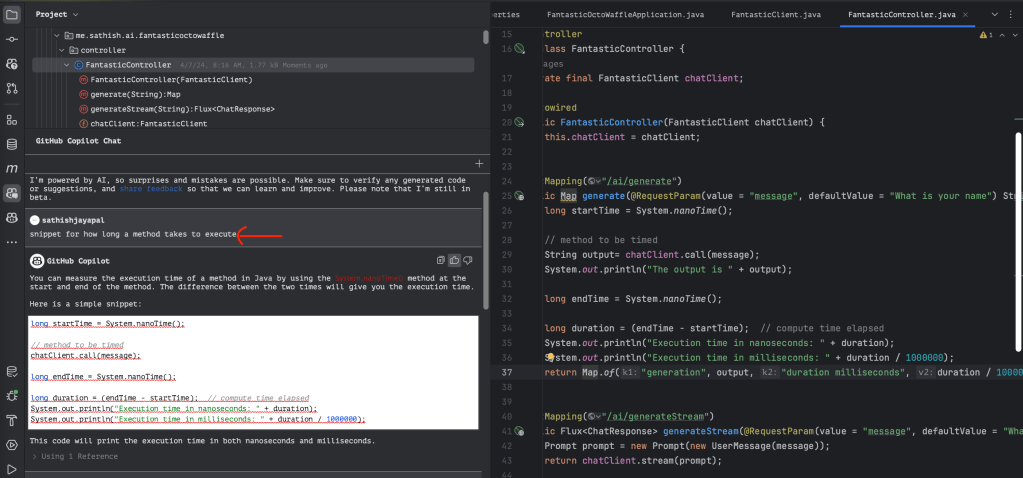
The highlighted prompt within ID was my ask, and Copilot generated the code and inserted it into the method. This saved quite a bit of time from me typing the code that is known.
Finally as you can see, the time it takes between a streamed model and a request response model. If you want to dig further with this code here is the Guthub.By analyzing the time difference between a streamed model and a request-response model, you can gain valuable insights. If you’re interested in exploring the code further and discovering more useful information, be sure to check out the Github link provided.

 Sathish Jayapal
You must be logged in to post a comment.